 SKU

Makers and handmade sellers
Know whether each product covers your materials, labels and time, and price new items with a margin you chose on purpose.
Sales tell you what sold. Your numbers tell you what's working.
See the real profit on every product and every channel, after fees, shipping and landed cost. Then price, choose channels and restock with confidence, instead of guessing from revenue.

Know your numbers
A busy month can still lose money once every fee, label and unit cost is counted. Knowing what each sale actually leaves you is what turns a busy shop into a healthy one.
See your break-even price and the price that hits your target margin, for every product on every channel.
Compare one product across six built-in channels and two of your own, side by side.
Rank products by monthly profit, so reorders go to the items that pay, not only the ones that sell.
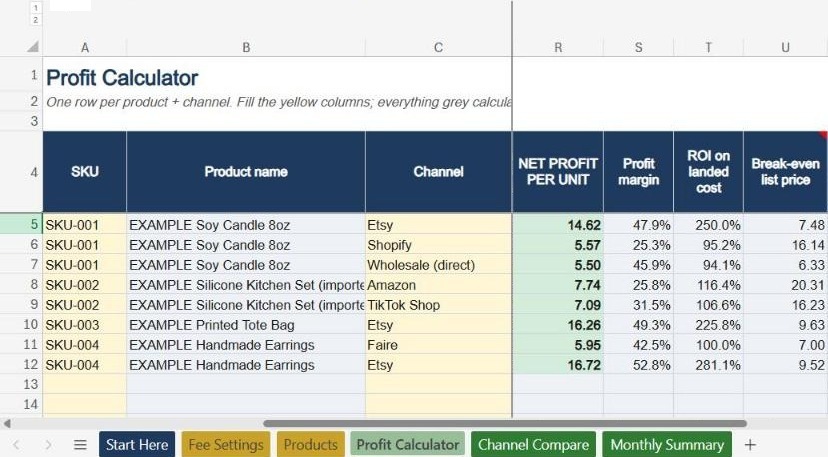
Etsy profit calculator example
This is the first example row in the calculator. Change any yellow number to see how the profit moves.
The full workbook does this for up to 300 product and channel rows at once.
Multi-channel profit calculator
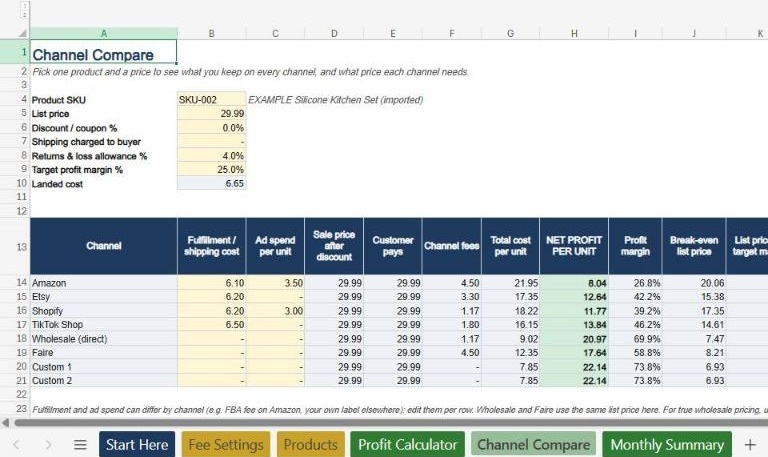
The Channel Compare tab runs one product through every channel at once, so you can see where each sale earns the most.
difference in profit per unit between the best and worst channel, for the same product at the same price.
Example data from the file: silicone kitchen set, $6.65 landed cost, 4% returns allowance. Amazon includes a $6.10 FBA fee and $3.50 ads per unit; Shopify includes $3.00 ads per unit. Your results depend on your own costs.
Pricing & profit margin calculator
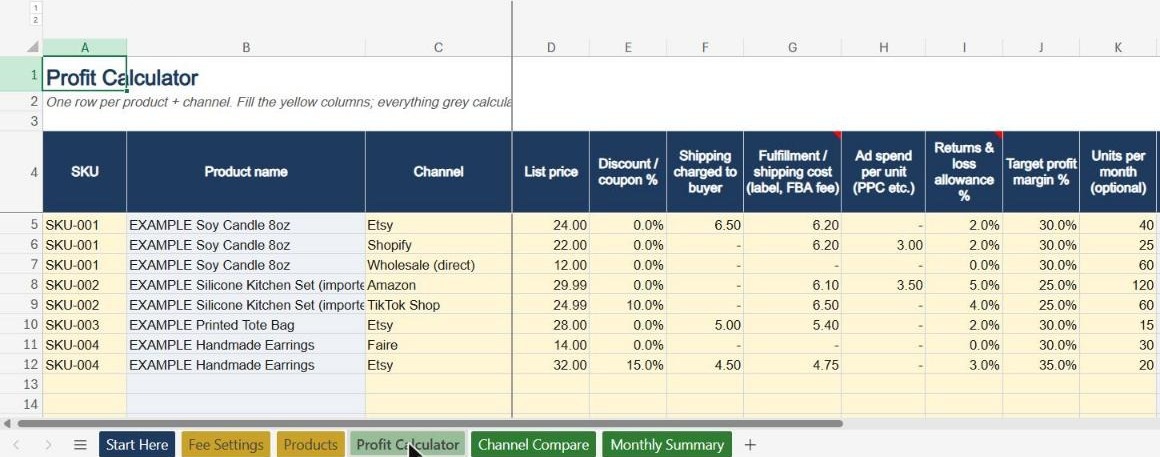
Type in the yellow cells. Everything in grey calculates. Nothing is locked.
One row per product and channel. Enter list price, shipping, fulfillment, ad spend and your target margin.
A short guide with a worked example, so you can start without a tutorial.
Pre-filled US fees for each channel, checked November 2026, with sources. Change a rate once and every row updates.
Product cost, freight, duties, packaging, labor and other costs, for up to 200 products.
Up to 300 product and channel combinations, with clear status colors.
One product on all eight channels, with the price each one needs to hit your margin.
Profit by channel after platform plans and subscription costs.
Who it's for
Know whether each product covers your materials, labels and time, and price new items with a margin you chose on purpose.

See Amazon, Etsy, Shopify, TikTok Shop and wholesale in one file, and put your effort where each product earns most.
Comparison
Most calculators we reviewed in November 2026 cover one marketplace. If you sell in more than one place, that means one tool per channel.
| SKU & Sense | Single-platform calculator | |
|---|---|---|
| Channels in one file | ✓6 built in + 2 custom | One marketplace |
| Compare one product across channels | ✓Channel Compare tab | Re-enter it in each tool |
| Landed cost (freight, duties, packaging, labor) | ✓Itemized per product | Often a single cost field |
| Break-even and target-margin price | ✓Every row | Varies by template |
| Monthly platform and subscription costs | ✓Monthly Summary tab | Usually not included |
| Fee rates you can edit | ✓One settings tab | Sometimes locked |
Check it yourself
Pricing
Excel + Google Sheets · version 1.0
If the file won't download or open in a supported app, doesn't do what this page describes, or you were charged twice, tell us within 10 days and we'll fix it or refund you.
If a formula in our original file is wrong, we fix it or refund you as your consumer rights require, even after 10 days.
Edits you make aren't a product defect, but they're easy to undo. Ask and we'll send a fresh copy of the original file, free.
The file lives on your computer or in your own Google Drive. There's no account to create.
FAQ
Yes. It works in Excel 2010 or newer, Excel for Mac and Microsoft 365, and in Google Sheets (upload the file to Google Drive and open it). We tested it in both Google Sheets and Excel before release. There are no macros or add-ins.
One .xlsx workbook with six tabs: Start Here, Fee Settings, Products, Profit Calculator, Channel Compare and Monthly Summary. The download link appears right after checkout and is also emailed to you.
It doesn't count stock. It shows profit per unit and per month for each product and channel, which tells you which items are worth reordering and at what price.
Update the rate once on the Fee Settings tab. Every product row and the channel comparison recalculate automatically.
Yes. Set the referral rate for your category and enter your FBA fee per unit in the fulfillment column.
Yes. Rename one of the two custom channels and enter its fees. It then works everywhere in the file, including Channel Compare.
EU and UK buyers: before payment you tick a box giving consent to immediate download and acknowledging that the 14-day withdrawal right ends once the download starts. Your answer is recorded with your order and listed in your receipt. If you didn't give that consent, use our EU/UK withdrawal form within 14 days. Etsy orders are also covered by Etsy's own purchase protection. Nothing in this policy limits your rights under the consumer law that applies to you.
No. It's a planning tool. Amounts work in any currency, and fees are set for US sellers and easy to change for other countries.
$19 one-time · Excel + Google Sheets · Instant download
Get the calculator $19